


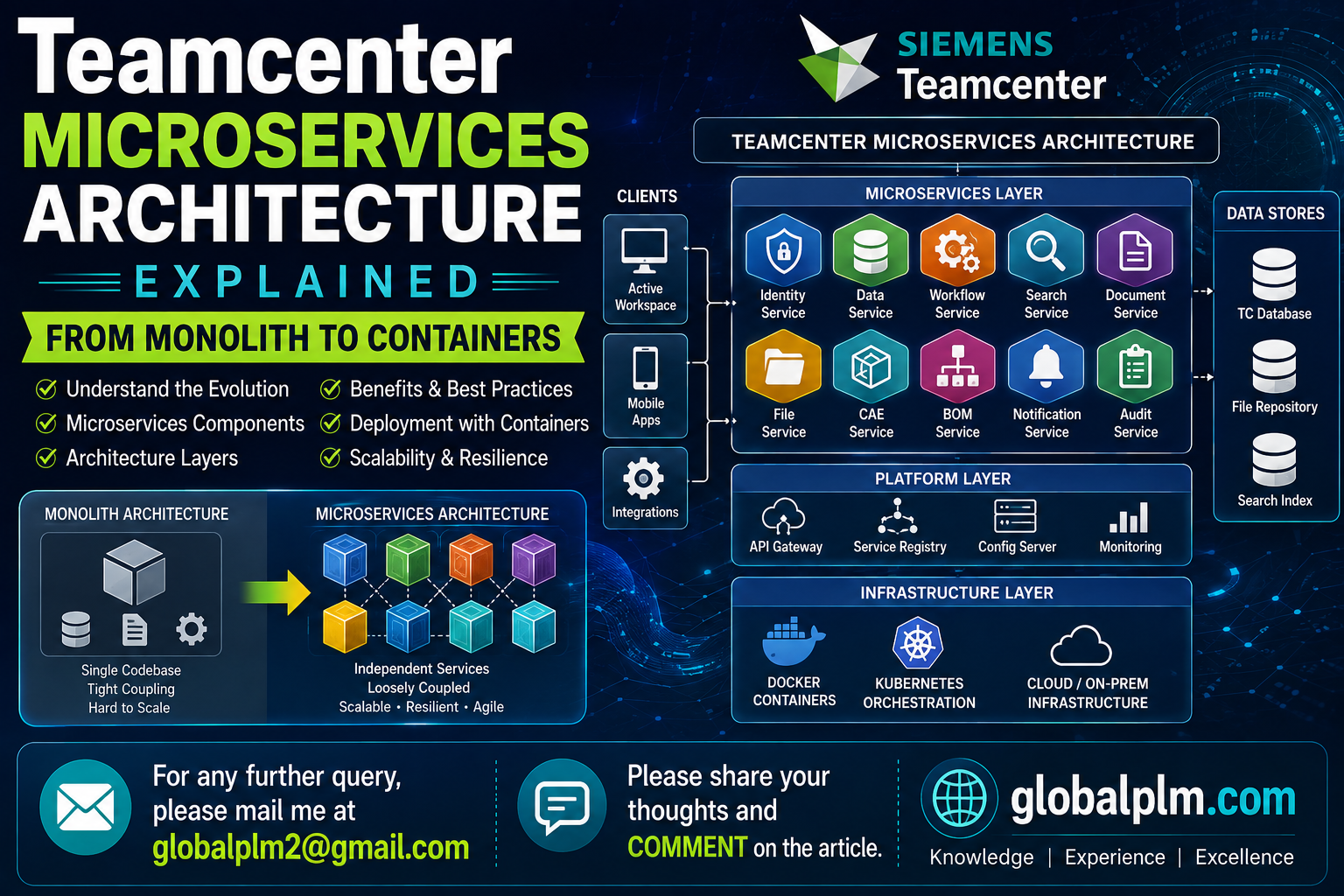
Teamcenter Microservices Architecture Explained: From Monolith to Containers
If you’ve managed Teamcenter for a few years, you probably grew up on the classic four-tier picture: client tier, enterprise tier, resource tier, database tier. That model still exists today. But if you’ve deployed Teamcenter X, or touched Classification AI or Requirements Management in a recent release, you’ve already been using microservices — whether you realized it or not.
This article breaks down what Teamcenter’s microservices architecture actually is, why Siemens built it this way, and what it changes for the people who administer these systems day to day.
Why Siemens Moved Part of Teamcenter to Microservices
The old monolithic approach to enterprise software has one recurring problem: everything is bundled together. Want to scale up one feature during a busy week? You end up scaling the whole application stack, because there’s no way to separate the pieces.
PLM systems ran into this problem hard. A company doing a bulk import of thousands of parts might suddenly need much more processing power for classification and validation — but only for a few hours. Under the old model, there was no clean way to give that one function extra horsepower without touching everything else.
Microservices solve this by breaking a subset of functionality out of the core application into independent, self-contained services. Each one can be scaled, updated, and restarted without redeploying the whole system. This is a big part of what makes Teamcenter X — Siemens’ SaaS version of Teamcenter — able to stay continuously updated with new AI and machine learning capabilities, instead of requiring the kind of scheduled downtime that traditional on-prem upgrades demand.
What “Microservices” Actually Means Inside Teamcenter
It helps to separate two things that often get blurred together: Teamcenter Foundation and Teamcenter Microservices.
Teamcenter Foundation is the core of the system. It holds the basic application features, the license-specific extensions, and the core data model that everything else is built on. This is the part that runs the traditional business logic — the tier that historically did nearly all the heavy lifting.
Microservices, by contrast, are API-driven functions that extend what the Foundation can do, particularly for things happening inside Active Workspace. They’re not a replacement for the Foundation — they sit on top of it, handling specific extra processing jobs the Foundation hands off to them.
Think of Foundation as the engine of the car, and microservices as a set of specialized modules bolted on for particular jobs — one for adaptive cruise control, one for parking sensors — each of which can be swapped, upgraded, or repaired independently without touching the engine.
A Real Example: Classification AI in Action
Here’s where this stops being abstract.
Imagine a manufacturing engineer at a mid-sized aerospace supplier needs to classify 4,000 newly imported parts into the company’s classification hierarchy — matching each part to the right class based on its attributes, so it can be found later through search and reused instead of re-designed from scratch.
In a purely monolithic system, this kind of bulk classification job would compete for the same server resources as everything else running in Teamcenter that day — user logins, workflow processing, file check-ins, all of it sharing one resource pool.
With Teamcenter’s microservices setup, Classification AI runs as its own containerized service. During that bulk import, the Classification AI container can be scaled up temporarily — more replicas spun up in Kubernetes — to chew through the classification workload faster, without slowing down anyone else who’s just trying to open a CAD file or run a routine workflow approval. Once the job finishes, the extra containers scale back down.
That’s the practical payoff of microservices: isolated scaling, without over-provisioning the entire platform “just in case.”
Requirements Management works the same way — as engineering teams manage large sets of requirements and their traceability links, that processing runs through its own microservice rather than loading extra weight onto Foundation.
Containers: Docker and Kubernetes, in Plain Terms
If you’re newer to this, here’s the short version.
A container packages a piece of software with everything it needs to run — code, libraries, configuration — so it behaves the same way no matter where it’s deployed. Think of it as a self-contained shipping crate instead of loading loose cargo into a ship’s hold.
Docker is the tool most commonly used to build and run individual containers.
Kubernetes is the system that manages many containers at once — starting new ones when demand goes up, shutting them down when it drops, restarting ones that crash, and distributing them across servers.
Teamcenter’s microservices are designed to run inside this kind of setup specifically so they can be containerized and managed this way. That’s what enables the Classification AI scaling scenario above — the container platform is doing the scaling work, not a human manually provisioning more servers.
Where Microservices Fit in the Bigger Picture
Zooming out, a Teamcenter deployment on cloud infrastructure typically includes several components working together:
-
Teamcenter Foundation — the core engine
-
Server Manager — coordinates server processes
-
Microservices — the extended, containerized functions like Classification AI
-
Gateway Service (GS) — the traffic director
-
File Management Services (FMS) — handles file transfer and storage
The Active Workspace Gateway plays a central role here: it routes both static content (HTML, CSS, JavaScript) and dynamic API calls to the right backend service — whether that’s the core SOA layer, File Management Services, visualization, or GraphQL queries. In effect, it’s the traffic cop deciding which requests go to Foundation and which get routed out to a microservice.
If you’ve already read our breakdown of Active Workspace architecture, this is the layer just underneath it — the routing and service logic that makes AWC’s browser-based experience possible.
Monolith vs. Microservices: A Quick Comparison
| Aspect | Monolithic (Traditional) | Microservices |
| Deployment | Entire application redeployed for any change | Individual service updated independently |
| Scaling | Whole system scales together | Only the service under load scales |
| Upgrade downtime | Typically higher | Typically lower |
| Resource use | Provisioned for peak load, always | Scales dynamically with demand |
| Cloud-native fit | Weak | Strong — this is what enables Teamcenter X |
What This Means for Teamcenter Admins Day to Day
If you’re administering a Teamcenter environment that includes microservices, a few things change:
- Monitoring gets more granular. Instead of watching one application’s health, you’re watching multiple independent services, each with its own logs and metrics.
- Deployment pipelines change. Updates can target a single microservice instead of a full-system release cycle.
- Troubleshooting shifts. A slow classification job might point to container resource limits rather than a database bottleneck — a different diagnostic path than admins are used to on the monolithic side.
- Capacity planning becomes more flexible. You can plan for baseline Foundation load separately from burst capacity for specific services.
This is also exactly why cloud reference deployments — like Teamcenter running on Azure — are built around this gateway-plus-microservices pattern from the ground up, rather than retrofitting it onto older infrastructure.
Where This Is Headed
Teamcenter’s shift toward microservices isn’t an isolated PLM trend — it mirrors what’s happening across enterprise software generally, where the pull toward cloud-native, independently scalable services keeps accelerating, driven in large part by the demand for AI-integrated workflows that need to scale unevenly and update constantly.
For Teamcenter specifically, this architecture is the backbone of Teamcenter X’s promise: a platform that stays current without the disruptive upgrade cycles of the past, built to absorb new AI and machine learning capabilities as they arrive rather than waiting for the next major release.
Understanding this layer isn’t just architectural trivia — it’s increasingly the difference between an admin who can explain why a service is slow and one who’s stuck guessing.
==============================================
Globalplm AI Assistant
Published article
Teamcenter 2606: Complete Guide to New Features and Enhancements
https://globalplm.com/teamcenter-2606-top-50-qa/
https://globalplm.com/category/teamcenter/
Understanding the Role of Artificial Intelligence in Teamcenter PLM
Top 50 Teamcenter Active Workspace Interview Questions and Answers (2025)
=========================================================================
What’s Next? We have more deep dives into PLM Tutorials, Teamcenter, and Active Workspace coming your way soon.
We value your feedback! Please share your thoughts in the comment section below.
If you have specific technical questions, feel free to post them in our Forum via the “Add Topics” button, and our team will provide a solution as soon as possible.
Stay Connected:
Follow us on our social media platforms for the latest updates, or
reach out with suggestions at [email protected].
[Facebook] | [LinkedIn] | [YouTube] | [WhatsApp +91-9545389857]
— Team GlobalPLM